
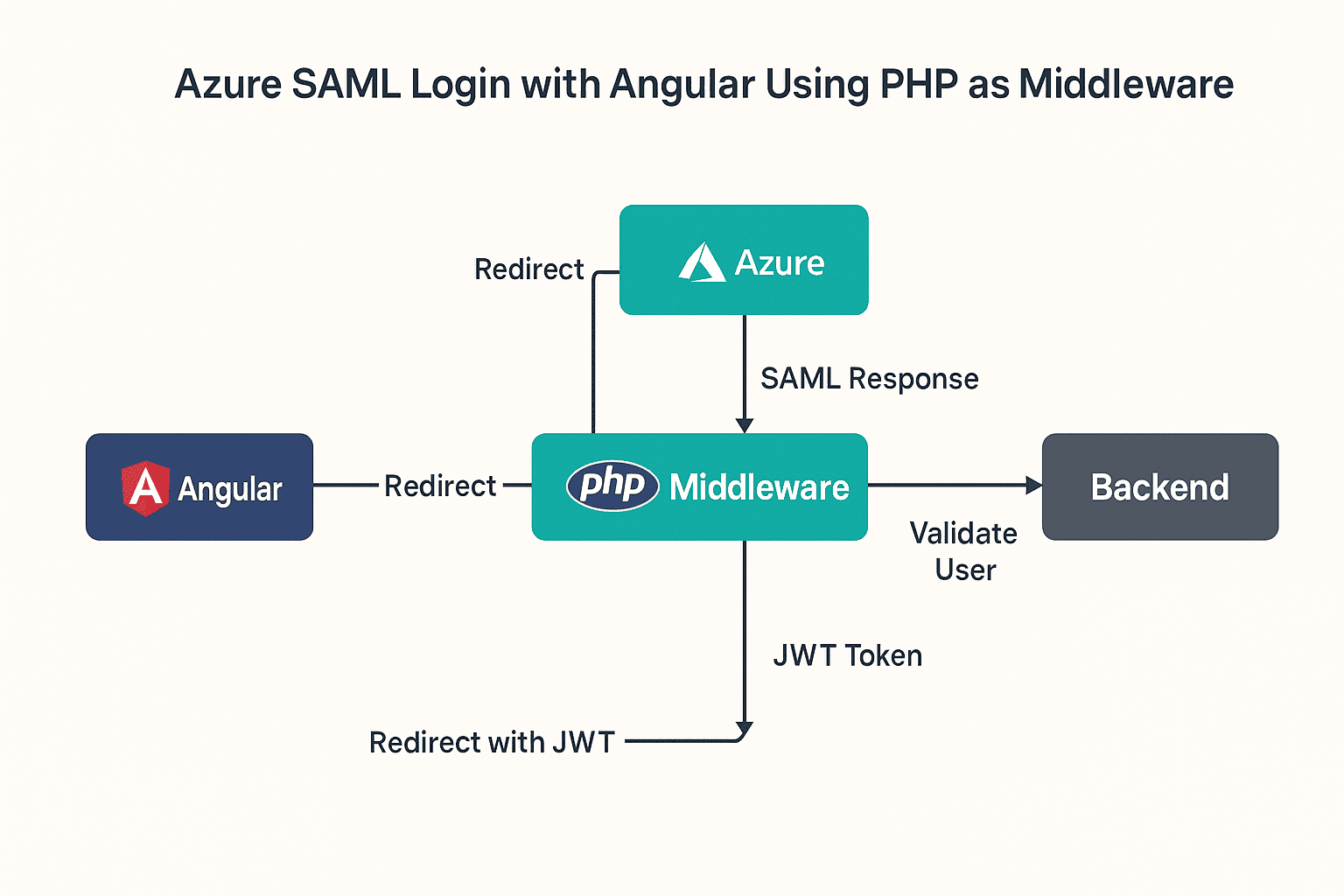
When I first set out to connect Azure SAML Single Sign-On (SSO) with my Angular app, I thought it would be quick and easy. After all, SSO is a standard, Angular is powerful, and Azure is… well, Azure.
But a few hours in, I realized this wasn’t going to be a plug-and-play situation. Angular lives entirely in the frontend world, while SAML is built for server-side processing. The two don’t naturally talk to each other.
I banged my head against this for a while before coming to the conclusion that I needed a bridge — something that could handle the server-side heavy lifting. That’s where PHP middleware came in.
And honestly? Once I made that shift, everything clicked. PHP takes care of the SAML handshake, validates the user, and then hands Angular a JWT token. From there, Angular just sees it like any other login flow.
[NOTE]: You can’t integrate SAML login directly with Angular or any frontend framework; you need support from a server-side technology.
Here’s exactly how I pieced it together.
Why I Needed PHP in the Middle
Angular simply can’t handle SAML responses. They’re big XML blobs full of sensitive data (name, email, attributes), and exposing that directly in the browser is a bad idea.
So PHP’s job is to:
- Accept the SAML response from Azure
- Pull out the useful attributes (first name, last name, email)
- Ask my backend, “Hey, is this user valid?”
- If yes, grab a JWT from the backend
- Redirect Angular with that token
Once I introduced that JWT step, Angular stopped caring about SAML entirely. It just saw a token and went about business as usual.
Step 1: Check Session in Angular
The first check happens on the Angular side. If a token already exists, no need to send the user to Azure again. If it doesn’t, I punt them to my PHP login page.
// Quick Angular session check

if (!sessionStorage.getItem('jwtToken')) {

  window.location.href = 'https://your-php-app.com/login.php';

}
That simple guard saved me from sending people through the SSO loop unnecessarily.
Step 2: The PHP Login File
On the PHP side, I leaned on the OneLogin SAML PHP library. Here’s a trimmed-down version of login.php that I started with:
<?php

session_start(); // don’t forget this

require_once __DIR__ . '/vendor/autoload.php';

use OneLogin\Saml2\Auth;

$settings = require('settings.php');

$auth = new Auth($settings);

if ($auth->isAuthenticated()) {

    $userEmail = $auth->getAttributes()['email'][0];

}

// Handle logout

if (isset($_GET['logout'])) {

    $auth->logout('http://localhost');

    exit;

}

?>
The biggest “aha” moment here was session_start(). I wasted a solid hour wondering why my sessions weren’t persisting before realizing I had left it out.
Step 3: Handle the SAML Response
Once Azure complete the login process, it return back a SAMLResponse. That’s when PHP needs to parse it, get the attributes.
Here’s what that looked like for me:
<?php

if ($_SERVER['REQUEST_METHOD'] === 'POST' && isset($_POST['SAMLResponse'])) {

    $samlResponse = base64_decode($_POST['SAMLResponse']);

    $dom = new DOMDocument();

    $dom->loadXML($samlResponse);

    $xpath = new DOMXPath($dom);

    $xpath->registerNamespace('saml', 'urn:oasis:names:tc:SAML:2.0:assertion');

    $emailNodes = $xpath->query("//saml:Attribute[@Name='http://schemas.xmlsoap.org/ws/2005/05/identity/claims/name']/saml:AttributeValue");

    $email = $emailNodes->length > 0 ? $emailNodes->item(0)->nodeValue : null;

    if ($email) {

        $postData = ['email' => $email];

        $apiUrl = 'https://backend-url.com/sso-login';

        $ch = curl_init($apiUrl);

        curl_setopt($ch, CURLOPT_RETURNTRANSFER, true);

        curl_setopt($ch, CURLOPT_POST, true);

        curl_setopt($ch, CURLOPT_HTTPHEADER, [

            'Accept: application/json',

            'Content-Type: application/json'

        ]);

        curl_setopt($ch, CURLOPT_POSTFIELDS, json_encode($postData));

        $response = curl_exec($ch);

        curl_close($ch);

        $responseData = json_decode($response, true);

        if (isset($responseData['token'])) {

            $token = urlencode($responseData['token']);

            header("Location: https://yourdomain.com/#/saml/login/$token");

            exit;

        } else {

            echo "User Error: " . $response;

        }

    } else {

        echo 'Email not found in SAML response.';

    }

} else {

    header("Location: login.php");

    exit;

}

?>
The key detail? URL-encode the token. The first time I didn’t, the redirect broke in such a confusing way I thought my whole flow was wrong.
Step 4: Grabbing the Token in Angular
At this point, Angular just needs to capture the token from the redirect and stash it in storage. That’s as simple as:
import { ActivatedRoute, Router } from '@angular/router';

constructor(private route: ActivatedRoute, private router: Router) {}

ngOnInit() {

  this.route.params.subscribe(params => {

    const token = params['token'];

    if (token) {

      sessionStorage.setItem('jwtToken', token);

      this.router.navigate(['/dashboard']);

    }

  });

}
From here, Angular behaves like it always does — the SAML dance is already behind the scenes.
Step 5: Secure the API Calls
Every call request to the backend needs the JWT. Just a header:
const headers = new HttpHeaders().set(

  'Authorization',

  'Bearer ' + sessionStorage.getItem('jwtToken')

);

this.http.get('https://backend-url.com/protected', { headers }).subscribe(...);
Step 6: LogOut Cleanly
You need to clear both Angular’s token and the Azure session. I ended up with:
logout() {

  sessionStorage.removeItem('jwtToken');

  window.location.href = 'https://your-php-app.com/login.php?logout=true';

}
Why This Setup Works for Me
- Safe: The sensitive SAML Data stays on the server side, far away from the browser.
- Flexible: Angular doesn’t care — this could just as easily be any frontend language.
- Smooth: If a session already exists, users will redirect into Angular without extra steps.
Wrapping Up
If you try to with Azure SAML straight into Angular, you’re in for a frustrating ride. It’s not designed for that, and honestly, it’s not safe either.
Dropping a PHP middleware in between gave me a clean solution:
- Azure + PHP handle the authentication,
- the backend validates the user and issues a JWT,
- Angular just does what it’s good at — managing the user experience.
For me, this setup was a lifesaver. If you’re wrestling with SAML and a modern frontend, I can’t recommend it enough. It’ll save you hours of confusion and give you a flow that just works.